A Touchscreen Smart Ring can make everyday business interactions feel quicker and more discreet. A tap on a tiny display might confirm a meeting reminder, show a delivery alert, or control a presentation without reaching for a phone. That convenience sounds modest. In a busy shop or during a site visit, modest can matter.
For a health-tech perspective, Dr. Hon Pak, Samsung’s digital-health executive, has emphasized making health insights useful and accessible. A concise editorial paraphrase of that principle is: “A useful wearable turns a small signal into a clear next step.” This is not a verbatim quotation. The distinction matters; business decisions should rest on verifiable claims, not polished attribution.
Choosing a Touchscreen Smart Ring means weighing more than appearance. Check whether the display stays readable under office lights, whether taps work with damp hands, and how often the device needs charging. Ask what information it collects, how it is protected, and whether it connects reliably with the tools your team already uses. Small screens have limits. So do battery cells. A ring that looks elegant in a product photo may frustrate staff after a long shift. That deserves honest testing. Pilot it with a few employees, note where it saves time, and listen when it does not. The business case is strongest when the ring solves a specific, repeated task—not when it adds another notification to an already crowded day.
What a Touchscreen Smart Ring Is and How It Works
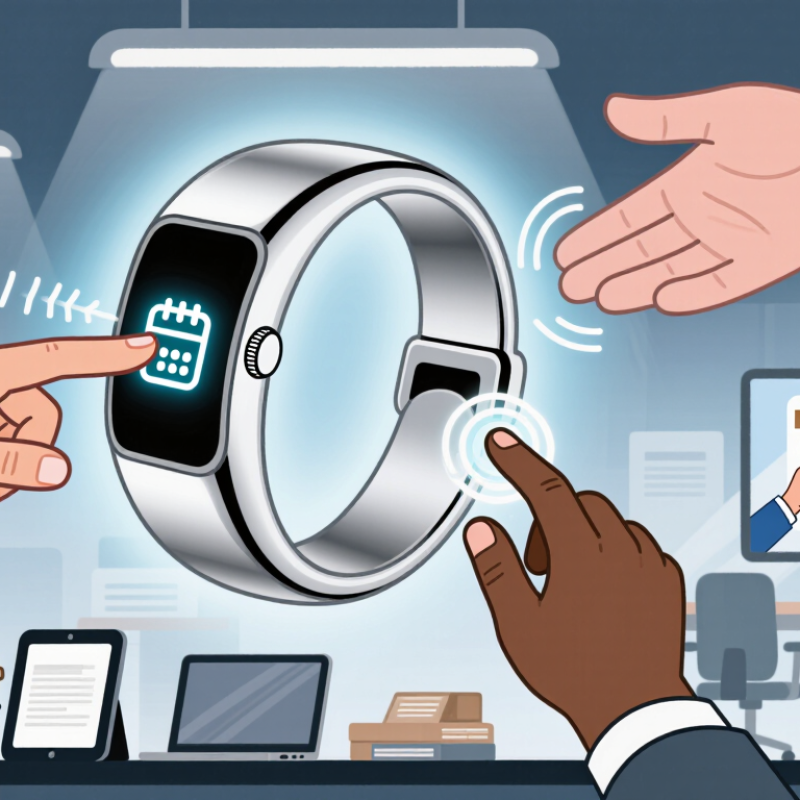
A touchscreen smart ring is a compact wearable with a small display built into its outer surface. Instead of checking a phone, a wearer can tap or swipe the ring to view selected information. Depending on the model, that may include the time, a calendar reminder, or a short notification. The screen is small by design. It is meant for quick checks, not reading long messages.
Inside, sensors track signals such as movement, while a low-power processor handles simple interactions. The ring usually connects to a phone through Bluetooth, and a companion app lets users choose alerts and settings. When a notification arrives, the ring can display a brief cue or provide a vibration. A tap might dismiss an alert or move between screens. Exact features vary, so businesses should check specifications and test the controls before choosing devices for staff.
For a sales meeting, a discreet glance at a schedule change may be less disruptive than taking out a phone. That convenience has limits. Small text can be hard to read, and touch controls may feel fiddly with cold or damp fingers. I would not assume every employee finds a ring comfortable. Consider battery life, fit, data permissions, and whether the information shown is appropriate for the workplace.
How Smart Rings Fit into Everyday Business Workflows
Why Choose a Touchscreen Smart Ring for Your Business?
How Smart Rings Fit into Everyday Business Workflows
A touchscreen smart ring can place small actions within easy reach during a busy workday. A tap might dismiss a reminder, check a meeting alert, or control a presentation while your hands stay near a keyboard. In a warehouse or clinic, a quick glance may be easier than taking out a phone. Features vary, so teams should check compatibility with their devices and work software before buying.
The case for fewer interruptions is practical. Microsoft’s 2023 Work Trend Index reported that 68% of surveyed workers lacked enough uninterrupted focus time. A ring could make selected alerts more discreet, helping staff notice a schedule change without pulling out a phone. It may also support quick task prompts between meetings or a silent timer during focused work. That is useful, but not magic. Poorly chosen notifications can move the distraction from a pocket to a finger.
A pilot can reveal whether the device genuinely fits the routine. For example, a sales team might use a brief vibration before client calls, while an operations team tests hands-free presentation controls. Track missed alerts, comfort, and battery life over several weeks. A tiny screen has limits, and constant glancing can become its own habit. Teams should decide which information belongs on the ring—and which can wait.
Why Choose a Touchscreen Smart Ring for Your Business? — How Smart Rings Fit into Everyday Business Workflows
A practical overview of potential workplace uses. Capabilities vary by device; confirm supported features, compatibility, and security controls before deployment.
| Business Workflow |
Possible Ring Interaction |
Potential Workplace Value |
Practical Considerations |
| Meeting notifications |
View or acknowledge a short alert on the ring’s display, if supported. |
Offers a discreet way to check reminders without taking out a phone. |
Small screens may limit readability; keep alerts brief and non-sensitive. |
| Calendar and task prompts |
Check a compact prompt, such as an upcoming appointment or task reminder. |
Can make quick schedule checks more convenient during transitions between tasks. |
Calendar synchronization and notification settings depend on the device and connected platform. |
| Presentation control |
Use a supported touch gesture to advance or control slides. |
May let a presenter move through slides without holding a separate clicker. |
Verify compatibility with presentation software and test gesture reliability before presenting. |
| Quick response to alerts |
Dismiss, acknowledge, or select a predefined response where available. |
Supports brief interactions when reaching for a phone is inconvenient. |
A ring is not a substitute for a full keyboard; avoid handling detailed or confidential messages on a tiny display. |
| Device access and authentication |
Use a supported proximity or tap-based function to interact with compatible systems. |
Could simplify selected access or sign-in steps when the organization’s systems support it. |
Require approved enrollment, access controls, and a backup method; features are not universal. |
| Mobile work and field tasks |
Check brief status updates or notifications while carrying out hands-on work. |
May provide glanceable information without requiring frequent phone handling. |
Assess durability, comfort, battery life, and suitability for gloves or safety equipment. |
| Wellness and activity awareness |
Review supported activity or wellness summaries on the ring or its companion app. |
Can help individuals monitor personal activity alongside work routines. |
Health-related measurements are not necessarily medical-grade; workplace use should respect employee privacy and consent. |
Business Benefits of Using a Touchscreen Smart Ring
A touchscreen smart ring can put quick actions within reach when a phone is awkward: confirming a meeting reminder, checking a timer, or controlling a presentation. Its small display suits brief interactions, not long emails or detailed dashboards. That distinction matters. A ring should reduce interruptions, not become another screen demanding attention.
IDC reported that global wearable-device shipments reached 534.6 million units in 2024, up 6.1% year over year. The figure reflects broad adoption, not proof that rings improve workplace productivity. Still, it signals growing familiarity with wearable technology. In a business setting, a ring may offer discreet alerts during client meetings or hands-busy tasks, while touch controls can make simple commands easier than searching through a phone.
Small gestures. Less fumbling.
The business case depends on fit. A delivery team might use vibration and a glanceable prompt to notice schedule changes; a presenter could advance slides without holding a remote. But tiny touch targets can frustrate users, and frequent notifications may distract rather than help. Organizations should test comfort, battery life, accessibility, and data handling before wider deployment. Start with one workflow, measure missed alerts and task interruptions, then adjust. The evidence is still developing, so expectations should stay practical.
Privacy, Compatibility, and Other Practical Considerations
A touchscreen smart ring may display meeting alerts, access prompts, or wellness readings within a glance. That convenience makes privacy settings important. Check whether sensitive details appear on the small screen, whether data is encrypted, and how long records remain stored. The 2024 Data Breach Investigations Report found that 68% of breaches involved a human element, including errors and social engineering. A ring cannot prevent those risks, but clear permissions and remote-lock options can limit exposure. Small screens matter.
Compatibility needs a hands-on trial. Confirm support for your team’s phone operating systems, device-management tools, and authentication workflows. Test pairing in a busy office, not just at a desk: Bluetooth interruptions can turn a quick approval into a delay. Also check battery life during a full shift, charging routines, and whether employees can use essential features without a personal account. These details vary by model and software version, so written specifications are not enough.
Procurement teams should also consider the cost of weak data controls. The 2024 Cost of a Data Breach Report placed the global average breach cost at $4.88 million. That figure is not specific to wearables, but it shows why access limits and incident procedures deserve attention. Ask who can view collected data, whether administrators can delete it, and what happens when a ring is lost. A pilot with a small group may reveal awkward gestures or confusing alerts. Some friction will remain. That is worth noticing.
How to Evaluate a Smart Ring for Your Business Needs
Why Choose a Touchscreen Smart Ring for Your Business?
How to Evaluate a Smart Ring for Your Business Needs
Start with the job, not the novelty. Will staff use the ring to confirm alerts, control equipment, or access simple workflows? List the actions they need during a typical shift. Then test those actions in realistic conditions, such as moving between rooms, wearing gloves, or working under bright lights. Small screens can make quick interactions feel fiddly. That matters.
Check compatibility with existing phones, software, and device-management tools before discussing a rollout. Ask how updates are delivered, what data the ring collects, and how access can be managed when an employee leaves. Request clear documentation rather than relying on a sales demonstration. Also compare battery life, charging routines, repair options, and expected replacement costs. A low purchase price may not mean a low operating cost.
Run a small pilot with employees from different roles and hand sizes. Track missed inputs, comfort after several hours, setup time, and support requests. Invite candid feedback; people may tolerate a clumsy tap during a demo but not during a busy shift. One limitation is easy to overlook: a touchscreen ring may not suit every task or user. Keep a fallback method available, and revise the evaluation criteria when real use exposes gaps.
Why Choose a Touchscreen Smart Ring for Your Business?
How to Evaluate a Smart Ring for Your Business Needs
Example buyer-priority scores on a 1–5 scale, not measured product ratings. Adjust the priorities to your workflow, then verify each candidate’s features, security practices, compatibility, battery performance, durability, and total cost before purchase.
Conclusion
A Touchscreen Smart Ring is a wearable device that combines a small touch-enabled interface with features such as notifications, activity tracking, and quick controls. In a business setting, it can help users check meeting reminders, view important alerts, or manage simple tasks without reaching for a phone or computer. Its compact design may make it useful during travel, presentations, and busy workdays, while offering a discreet way to stay informed and keep everyday workflows moving.
Before choosing one, businesses should consider how the ring handles personal and work data, whether it works smoothly with existing devices and software, and whether its battery life, comfort, durability, and display meet employees’ needs. It is also important to assess accessibility, setup requirements, and any workplace policies that may affect its use. Comparing these practical factors against specific business goals can help determine whether a smart ring is a convenient addition to the team’s tools.