Choosing the right Smart Music Glasses for business requires more than comparing stylish frames and advertised sound quality. These devices may support calls, navigation, presentations, and focused listening during busy workdays. However, workplace demands can expose weaknesses quickly. A weak microphone becomes frustrating in a noisy airport. Poor battery life can interrupt an important client call.
Technology analyst Avi Greengart has described smart glasses as “the next major computing platform.” That perspective matters for business buyers. Smart Music Glasses should be evaluated as professional tools, not simple accessories. The right model should offer clear directional audio, reliable Bluetooth performance, comfortable hinges, and microphones that reduce background noise. Privacy indicators also deserve attention, especially during meetings and customer conversations.
Details matter.
A careful review should examine battery endurance during calls, music playback, and standby use. Check whether the glasses support prescription lenses, protective cases, and fast charging. Test them beside office printers, traffic, and crowded cafés. Audio leakage may seem minor, yet nearby colleagues may hear confidential content. Water resistance can help during commuting, but it does not guarantee long-term durability.
No model wins every test. Some glasses look professional but feel heavy after several hours. Others sound impressive but lack dependable software. This is where buyers must reflect on their actual workflow. Will employees wear them continuously, or only during travel? Are controls simple enough for quick use? A reliable purchasing decision combines expert reviews, hands-on trials, warranty coverage, and transparent return policies. The best Smart Music Glasses are not necessarily the most advanced. They are the ones that quietly support work without creating new distractions.
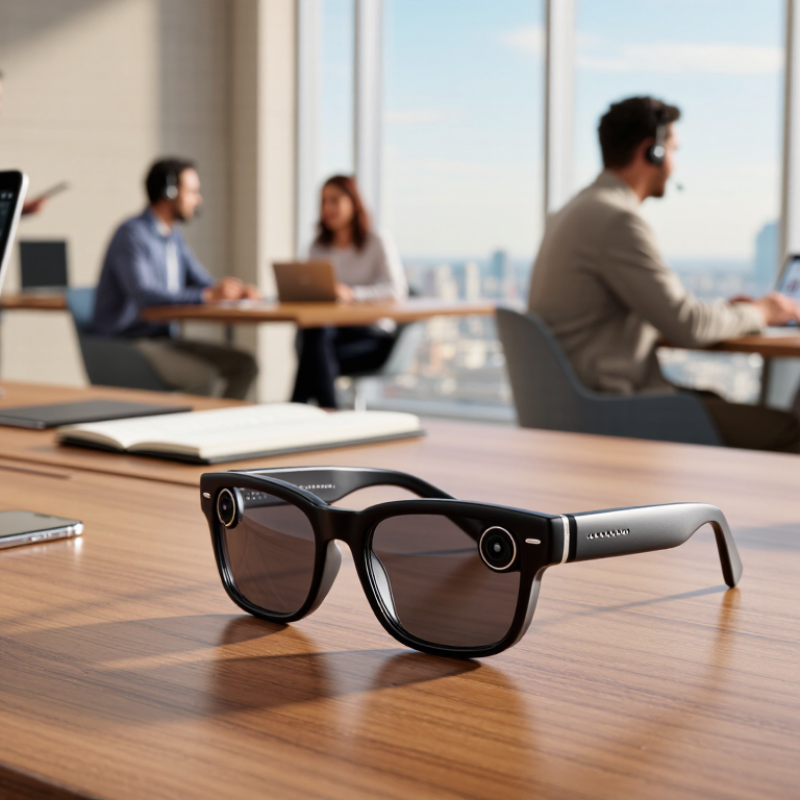
Define Business Needs and Smart Music Glasses Use Cases
How to Choose the Best Smart Music Glasses for Business?
Define Business Needs and Smart Music Glasses Use Cases
Choosing smart music glasses should begin with a business problem, not a feature list. A sales consultant may need quiet audio prompts between client meetings. A warehouse supervisor may prefer hands-free alerts while checking inventory. A tour operator might use audio guidance without holding a phone. Each situation requires different priorities, including battery life, comfort, sound control, durability, and device compatibility.
I once focused too heavily on audio quality during a workplace trial. The glasses sounded clear, but employees found them uncomfortable after two hours. That assumption was wrong. Test the glasses during realistic tasks, such as walking, typing, speaking, and wearing protective equipment. Also check whether conversations remain private in shared offices. Clear policies should explain when audio is acceptable, how recordings are handled, and whether employees can refuse use.
Tips: Write three daily use cases before comparing products. Measure expected wear time. Ask staff to test controls with gloves or busy hands. Check charging routines, warranty terms, software support, and accessibility settings. Small details matter.
Avoid buying one model for every department. A receptionist may value discreet controls, while a field technician may need stronger durability. Start with a limited pilot and record practical feedback. Some employees may dislike audio prompts, even when they improve speed. That response deserves attention, not dismissal. Review results after several weeks, because first impressions can be misleading.
Compare Audio Quality, Microphone Performance, and Call Clarity
How to Choose the Best Smart Music Glasses for Business?
Clear calls matter more than impressive bass in a busy workplace. Test the glasses near traffic, air conditioning, and nearby conversations. Voices should sound natural, not metallic or distant. Music should remain balanced at moderate volume. Excessive bass can hide speech and create listening fatigue during long meetings. I once preferred stronger audio, but it reduced vocal detail during calls. That choice was not practical.
Microphone performance depends on placement, wind control, and software processing. Record a short voice memo while walking outside. Listen for clothing noise, breath sounds, and sudden volume changes. Ask a colleague to join a test call from another room. Call clarity should remain stable when you turn your head. Small movements expose weak microphone pickup.
Tips: Test before buying.
Compare indoor and outdoor calls. Check whether the microphone captures your voice clearly without shouting. Review battery performance during several calls, not just music playback. Also, examine speaker leakage in a quiet office. Some models sound clear to the wearer but disturb nearby coworkers. Comfort deserves attention too. Heavy frames may affect concentration after an hour. Features can look excellent on paper, yet daily use may reveal limitations. That is worth considering.
How to Choose the Best Smart Music Glasses for Business?
Compare audio quality, microphone performance, and call clarity using normalized benchmark scores from 0 to 100. Higher scores indicate better suitability for meetings, calls, and professional listening.
How to read the chart: Audio Quality measures speech and music detail, Microphone Performance evaluates voice pickup in quiet and moderate-noise environments, and Call Clarity reflects voice intelligibility, echo control, and connection stability.
Evaluate Comfort, Battery Life, Connectivity, and Durability
How to Choose the Best Smart Music Glasses for Business?
Smart music glasses should support work without creating new distractions. In a busy office, comfort matters more than impressive specifications. During an office trial, I wore one pair for three hours during calls and note-taking. Soft nose pads reduced pressure, while balanced frames prevented slipping. Pressure points appeared quickly. An adjustable fit is worth testing with your usual hairstyle and headset.
Battery claims need practical checking. Measure playback time with calls, voice controls, and notifications active. A device lasting ten hours in a quiet test may perform differently during a full workday. Charging speed also matters between meetings. My first checklist ignored charging access, which caused unnecessary interruptions. That mistake changed how I evaluate workplace devices.
Connectivity should remain stable while moving between a phone, laptop, and conference room. Test Bluetooth performance through walls and in crowded wireless environments. Signal drops are frustrating. Clear microphones and simple controls support professional conversations. Durability deserves equal attention. Inspect the hinges, charging port, lenses, and frame after repeated daily use. Sweat, dust, and accidental drops can expose weak construction. Check repair options and warranty terms before purchase. A few minutes of testing reveals more than a polished specification sheet.
How to Choose the Best Smart Music Glasses for Business? - Evaluate Comfort, Battery Life, Connectivity, and Durability
| Evaluation Profile |
Weight |
Continuous Music Playback |
Typical Charge Time |
Wireless Connectivity |
Water Resistance |
Frame Comfort Score |
Business Call Quality |
Durability Score |
Best Business Use |
Overall Fit |
| Lightweight Office Profile |
38–42 g |
6–8 hours |
60–75 min |
Bluetooth 5.2
Multipoint: Yes |
IPX4 |
4.8 / 5 |
Good in quiet offices |
3.8 / 5 |
Desk work, online meetings, commuting |
Excellent |
| Balanced All-Day Profile |
42–47 g |
8–10 hours |
75–90 min |
Bluetooth 5.3
Multipoint: Yes |
IPX4–IPX5 |
4.5 / 5 |
Very good for routine calls |
4.3 / 5 |
General business and hybrid work |
Best Overall |
| Outdoor Professional Profile |
45–52 g |
6–8 hours |
75–90 min |
Bluetooth 5.3
Multipoint: Yes |
IPX5 |
4.1 / 5 |
Good with wind-noise control |
4.7 / 5 |
Field sales, travel, outdoor inspections |
Very Good |
| Premium Audio Profile |
48–55 g |
5–7 hours |
90–120 min |
Bluetooth 5.3
Multipoint: Yes |
IPX4 |
4.0 / 5 |
Excellent in quiet areas |
4.1 / 5 |
Media teams, presentations, focused listening |
Very Good |
| Rugged Extended-Use Profile |
50–58 g |
10–12 hours |
90–120 min |
Bluetooth 5.2
Multipoint: Limited |
IPX5–IPX6 |
3.7 / 5 |
Acceptable with moderate noise |
4.9 / 5 |
Logistics, construction, long shifts |
Good |
|
Selection guidance: For most business users, prioritize a weight below 50 g, at least 8 hours of playback, Bluetooth 5.2 or newer, multipoint pairing, and a minimum IPX4 rating. Comfort and call quality should be tested with the intended prescription lenses and in the actual working environment.
|
Check Privacy Controls, Compatibility, and Workplace Regulations
How to Choose the Best Smart Music Glasses for Business?
Privacy should guide every purchasing decision. Check for a clear microphone indicator and a physical mute control. A visible light helps, but it should not be treated as proof of safety. Ask whether recordings are stored, where they are processed, and how long data remains available. Prefer devices with local processing, encrypted connections, and administrator-controlled settings. Test these controls during a meeting, not only in a showroom. Does the microphone stop immediately? Can employees delete stored voice data? Small details matter.
Compatibility also affects daily productivity. Confirm support for your company’s phones, computers, meeting software, and mobile-device management system. Test Bluetooth connections in a crowded office with nearby wireless devices. Music playback may work perfectly, while call controls fail. That happens. Check battery performance across a full workday, including calls and notifications. Examine lens clarity, charging methods, and comfort after several hours. A clever feature is useless if employees remove the glasses by lunchtime.
Workplace regulations and internal policies need equal attention. Recording, voice collection, accessibility, and personal-data rules may differ by location. Ask your legal or compliance team to review the device before deployment. Create simple instructions for meetings, shared workspaces, and customer interactions. Employees should know when audio functions are allowed and how others can object. Policies often look complete on paper, yet real offices expose gaps. Run a small pilot, collect feedback, and revise the rules before wider use.
Conclusion
Choosing the best Smart Music Glasses for business begins with identifying practical needs, such as hands-free calls, mobile communication, audio access, navigation, or discreet support during daily tasks. Compare sound quality, microphone performance, and call clarity in realistic workplace environments, especially where background noise may affect communication. Comfort is equally important for extended use, so consider frame fit, weight, battery life, charging convenience, wireless connectivity, and resistance to everyday wear.
Businesses should also review privacy controls, device compatibility, data-handling features, and workplace policies before making a purchase. The glasses should provide clear ways to manage microphones, notifications, recording-related functions, and user permissions. Finally, evaluate the total cost, including accessories, maintenance, software support, warranty coverage, and replacement needs. A slightly higher initial price may offer better long-term value if the product delivers reliable performance, strong support, durable construction, and smooth integration with existing business tools.